Welcome to my site - My aim is to help all you people with non-original R4SDHC flash carts get the latest firmware . Video Instruction's above in 'Video Tutorial' tab. Also feel free to contact me in the forum, I will help in any way I can. Now works with R4-III Upgrade. By RamboJambo21. |
||||||||||||||||
|
Read Me First:
To start with, download the main R4SDHC kernel at http://www.r4sdhc.com/r4sdhc.asp. Put it on the root of your Micro SD card like normal. Then download the latest Wood version on the left. Once you have done that extract it and copy the two files in the zip to the root of your Micro SD, start up your DS, R4 will load, then click games and select the file called woodr4sdhc.nds to start Wood and you can play all your games. For YSMenu download the zip file then copy TTMenu and DEFAULT.nds to your Micro SD so when you start the DS, YSMenu will load automatically. |
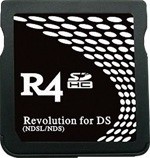
Flash Cart - It must look like this! ![]() Read Me for R4III: For Wood just follow the same instructions for R4SDHC on the left. For YSMenu use the R4 III folder included in the download and follow the red instructions on the left. |
||||||||||||||